Marketing as code, part 1: Mama's reels
We needed reels of Mama chatting on WhatsApp. Instead of recording real chats, I built a WhatsApp simulator that plays them from a script, and turned thirteen of them into reels in three days.
Mama lives in WhatsApp, so the easiest way to show someone what she does is to show them a chat. You type “Parking RM5”, the ticks turn blue, and Mama replies with what she recorded and how much of your weekly transport budget is left.
On Instagram, that means reels. This month we made thirteen of them, one for each thing Mama can do: tracking expenses, reading receipts, budgets, reminders, checking scam numbers and so on.
Why not just record a real chat?
The obvious way to make a reel like this is to open WhatsApp, chat with Mama and record the screen.
I wanted more flexibility than that. A recording is a single take. With a simulator, I could replay a chat as often as I liked, like an actor rehearsing his lines: change a line, shorten a pause, and run the scene again until it’s right.
When we first designed Mama’s conversations, we drew them as WhatsApp screenshots, one message at a time. Those were stills, though, and a reel needs the chat to move.
So I built a WhatsApp that plays from a script.
A WhatsApp simulator
It runs in the browser. There’s a phone drawn to look like WhatsApp on an iPhone, with the ticks, the typing dots, reactions, buttons, list pickers and quoted replies.
Each chat is a scenario, which is a list of steps with a pause after each one. Type this, send it, show the ticks, show Mama typing, send her reply. This is the start of the expense tracking scene:
{ action: { type: 'show_input_text', text: 'Parking RM5' }, delayAfter: 1000 },
{ action: { type: 'clear_input' }, delayAfter: 100 },
{ action: { type: 'send_message', message: {
  id: 'u1', direction: 'outgoing', type: 'text',
  text: 'Parking RM5', timestamp: '8:30 AM', tickStatus: 'sending'
}}, delayAfter: 300 },
{ action: { type: 'update_ticks', messageId: 'u1', status: 'sent' }, delayAfter: 300 },
{ action: { type: 'update_ticks', messageId: 'u1', status: 'delivered' }, delayAfter: 400 },
{ action: { type: 'add_reaction', messageId: 'u1', emoji: '🔄' }, delayAfter: 300 },
{ action: { type: 'set_online_status', status: 'typing...' }, delayAfter: 200 },
{ action: { type: 'show_typing', duration: 1200 }, delayAfter: 1200 },
{ action: { type: 'hide_typing' }, delayAfter: 100 },
{ action: { type: 'update_ticks', messageId: 'u1', status: 'read' }, delayAfter: 0 },
Changing the scene means changing the script. Make Mama reply faster, swap “Parking RM5” for something else, add a reaction, and play it again.
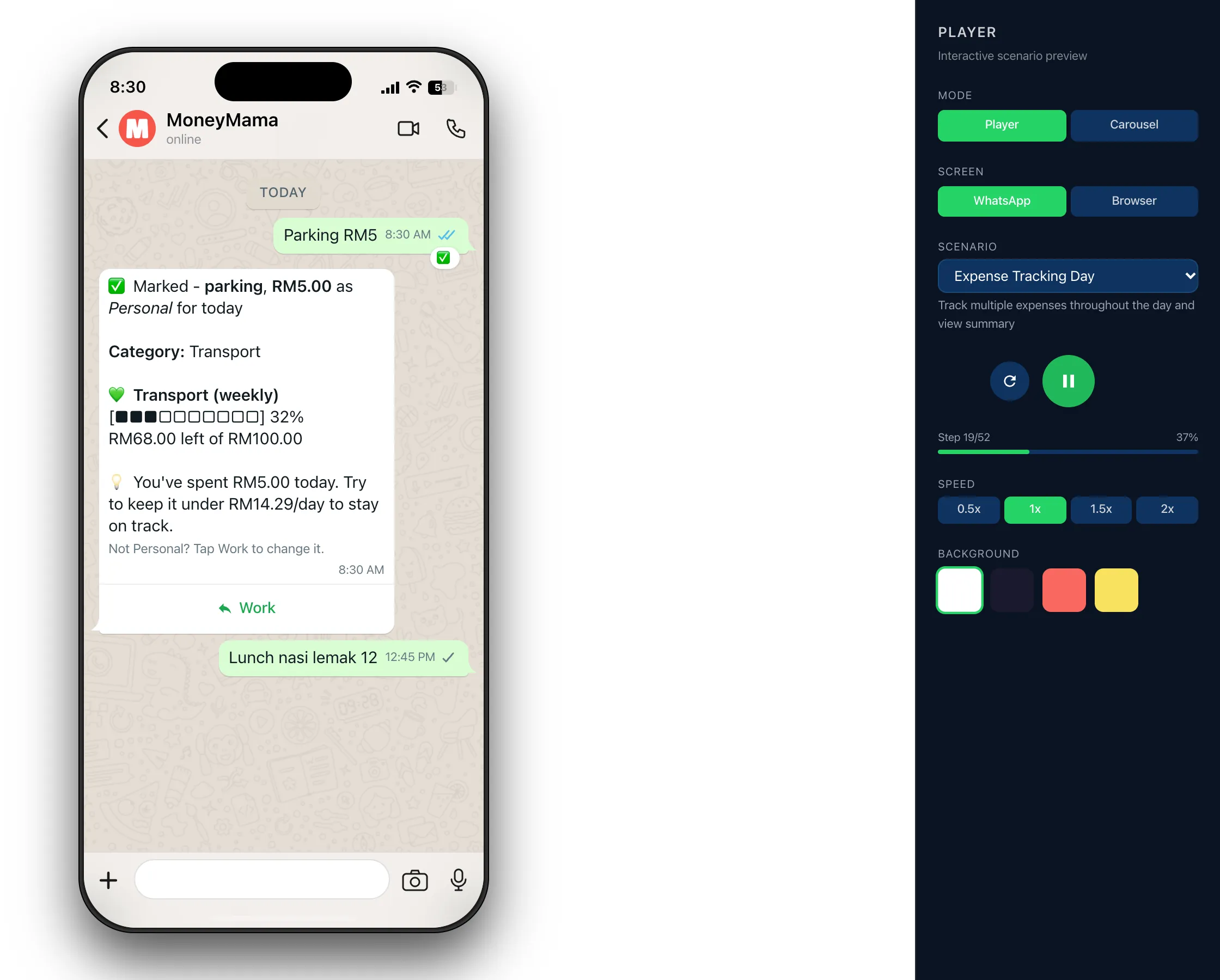
Turning the scenes into reels
For the videos I used Remotion, which lets you build video out of React components, along with Remotion’s own skill for Claude Code.
The same scenario that plays in the browser becomes the phone in the reel. Around it, each reel gets a short intro with our logo, captions that come in on the right beats, the camera zooming into Mama’s replies as they arrive, and an outro with moneymama.co. The camera moves are timed against the script, so they land on the right message every time.
For the dashboard reel, the phone switches to Safari and scrolls through screenshots of the real dashboard.
The music came from Suno
For the music, I just needed something to back the reels without any copyright worries, and AI music generation now makes that possible.
I made the tracks with Suno, eighteen of them in about an hour one morning, with names like “MoneyMama Jingle” and “MoneyMama On My Phone”. Almost every reel has its own, fading in at the start and out under the outro.
Built with Claude Code
I built all of this with Claude Code, and it took three days from the first commit to thirteen rendered reels.
A tool like this would have taken me weeks before. Claude Code has made building things like this relatively simple, especially for seasoned developers, and for something this size it’s now almost trivial.
All thirteen are scheduled on our Instagram.
The same scripts also make the still images for our Instagram posts and carousels. That’s part 2.