Building from scratch, with agents
I've joined FinLit Media, the company behind Mr Money TV, to build an AI financial chatbot from scratch. It's a change from seven years of Hargapedia, both in what I'm building and how I'm working.
A couple of weeks ago, I wrote about my seven years with Hargapedia. This is the other half of that story, what I’ve moved on to.
I’ve joined FinLit Media, the company behind Mr Money TV, as CTO. My job is to build an AI financial chatbot called MoneyMama and take care of the technology behind it.
After seven years of working on Hargapedia, where we had an established product, codebase and engineering team, I’m back to building something from scratch. That’s what appealed to me about the role. I get to make the technical decisions from the beginning, and this time I’m working with LLMs, which is something I’ve been wanting to explore more seriously.
The working environment is quite different too, but I’ll get to that.
Starting with almost nothing
I’d been helping out since March, before coming on full time. At that point, MoneyMama was mostly a concept, with a retirement calculator on the website. There wasn’t a chatbot yet.
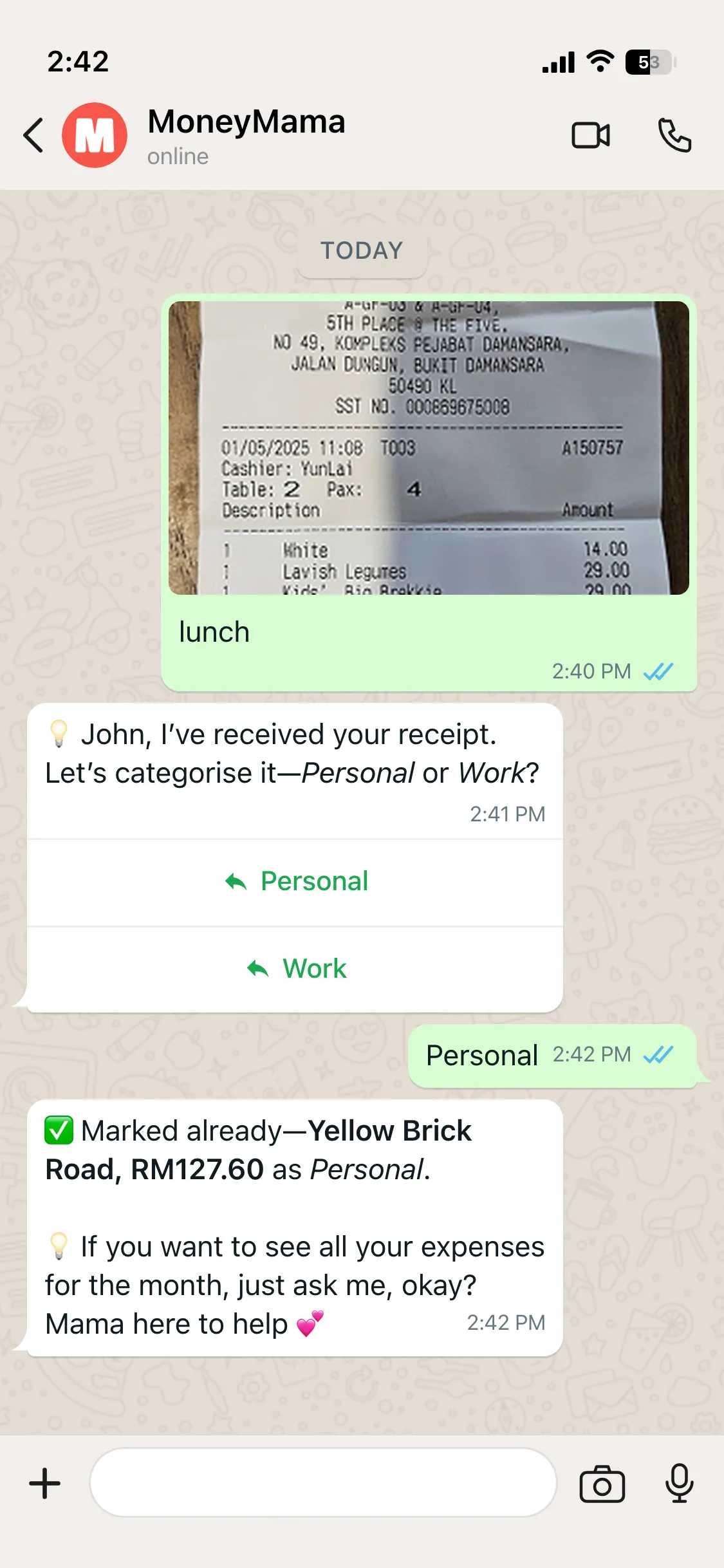
What we’re building now is a financial assistant that lives on WhatsApp. You message Mama the way you’d message anyone else. It could be something you just spent, a photo of a receipt, a bank statement or a question about your finances.
The first feature we built for the bot was reminders, to remind people to pay their bills. We’re assuming people open WhatsApp for messages all the time, so a reminder from Mama would make sense there.
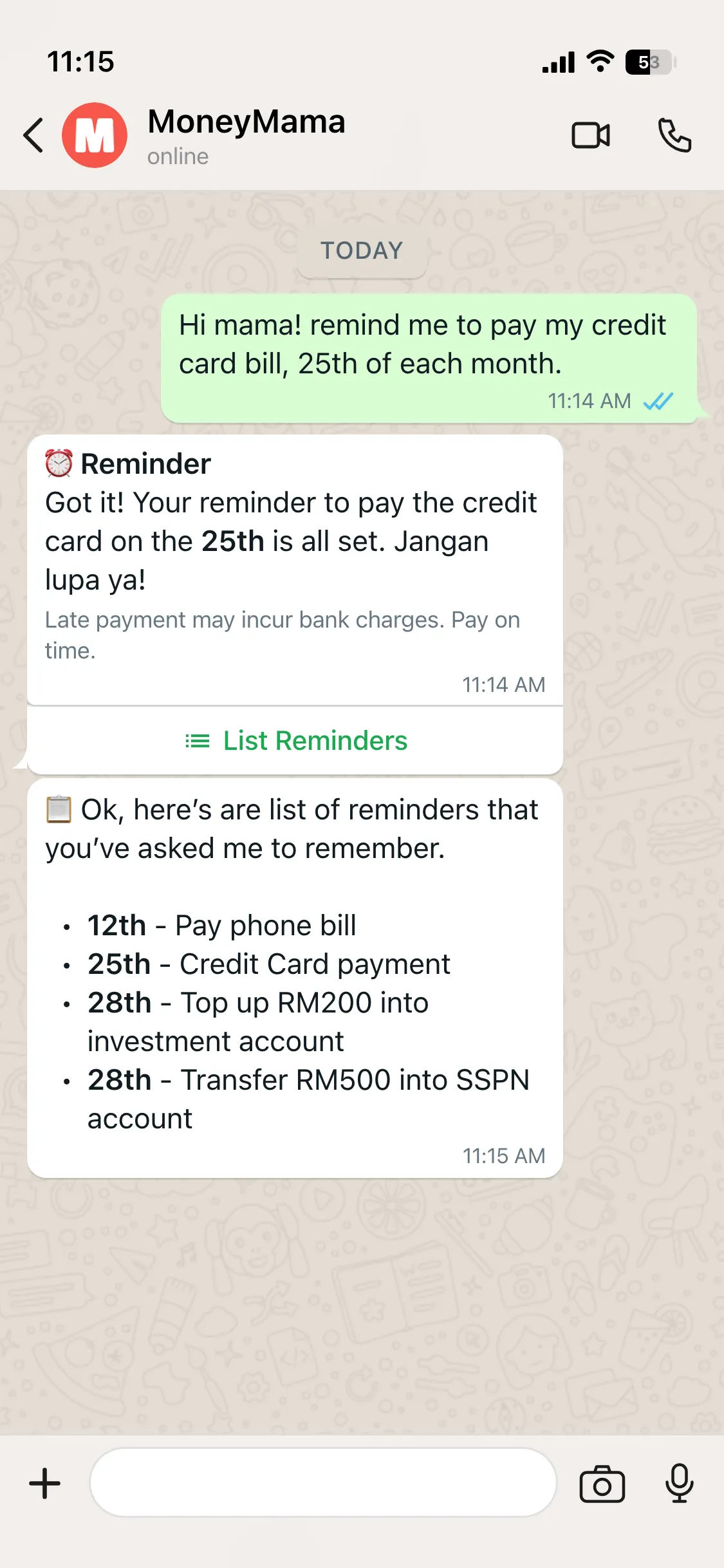
Mama needs to understand what you’ve sent and decide what to do with it. An expense needs to be recorded, a receipt needs to be read, and a financial question needs a different kind of response.
The backend is in Node.js and TypeScript, with OpenAI handling the language understanding and tool calling. Messages come in through WhatsApp, reach our webhook, get processed and go back to the user as a reply.
That sounds straightforward enough, but before getting to the AI, I had to figure out how we were going to work with WhatsApp itself.
Getting onto WhatsApp
WhatsApp development was new territory for me.
There are two ways to connect a chatbot to it. The unofficial route uses libraries such as whatsapp-web.js or Baileys, which let a script operate a regular WhatsApp account. It’s relatively quick to set up and doesn’t carry Meta’s official messaging charges.
I considered that approach, but there’s a real risk of the number getting banned. For something we’re building as a product, I didn’t want to depend on that.
So I went with Meta’s official Cloud API, using a business number.
Going official also meant understanding Meta’s pricing, because WhatsApp messages don’t all cost the same.
Under the current rules, when someone messages Mama first, a 24-hour customer service window opens. We can reply within that window without paying for ordinary service messages. Outside that window, or when we want to initiate a conversation, we need to use a template approved by Meta.
Those templates fall into marketing, utility and authentication categories, each with its own charges.
Reminders ran straight into this. A bill reminder goes out once a month, so it’s almost always outside the window, and it’s Mama writing first. Every reminder has to go out as an approved template.
It took some getting used to, especially since the window resets whenever the user sends another message. Messaging costs are something we have to account for when designing how Mama communicates, rather than treating WhatsApp like an ordinary chat interface we control entirely.
With that part settled, I could concentrate on how Mama would understand the messages coming in.
How much of an agent does Mama need to be?
This was the part I was most interested in.
A message like “Lunch RM15” should be recorded as an expense. A photo of a receipt needs to be processed differently, while “How much did I spend this week?” is a question about information we’ve already stored.
Before Mama can do anything useful, she needs to work out what the user wants.
My first thought was to use an agentic workflow. One of the early frameworks I tried was Mastra, where an agent can plan what to do, call a tool, look at the result and decide what to do next.
It worked, but I found the token cost a little high. Each additional step meant another model call, and for the kind of messages Mama would be handling, I wasn’t convinced we needed that much orchestration.
I ended up taking a simpler approach using OpenAI’s tool calling.
Rather than have an agent repeatedly plan its next action, the model identifies the intent and selects the appropriate tool. The backend then executes it, whether that’s logging an expense, processing a receipt or handling another supported request.
The important part for me was getting the classification right. If Mama misunderstands what the user wants, having more tools or a more elaborate agent workflow won’t help much.
Interactive messages help with that. The Cloud API lets Mama send reply buttons, up to three on a message, and list messages with up to ten options. When someone taps one, what comes back is the button’s id rather than free text, so there’s nothing to classify.
That became a rule in our mock-ups: every choice the user has to make is a button. Personal or Work for a receipt. Yes, No or Don’t remind me anymore when a reminder lands. Nobody has to type “yes” or spell out a date, and a tap counts as a message from them, which keeps the 24-hour window open.
It’s still early, and there’s plenty to figure out about how to handle different messages, especially when people don’t phrase things the way we expect.
Working alone, mostly
The other big change has been the team, or rather, the lack of one.
At Intrack, we had six people in engineering. Here, it’s mostly me, with Kelvin helping as a part-time developer three days a week.
The first few weeks were lonely. I’d been used to having other engineers around to discuss ideas, question decisions and figure things out together. Now I spend a lot more time working things out on my own.
It can feel like working in a silo.
I’ve ended up spending quite a bit of time talking through ideas with Claude and ChatGPT, particularly when working out the initial architecture. For coding, I started with Copilot, then experimented with ChatGPT, Cursor and Claude.
It’s a different way of working. I’m still making the decisions and building the system, but I have these tools available to explore approaches and work through things when there isn’t another engineer sitting nearby.
There’s a certain irony in using AI tools to help me build an AI assistant. I’m still learning both sides of it, how to work effectively with these coding tools and how to design Mama herself.
Update, October 2026: a lot has changed since. The planning screenshots got a post of their own, the classifier was rebuilt for speed, the model moved from GPT-4.1 to GPT-6.1, Mama got a knowledge base and a native app. The whole arc, from the first GPT report to building with agents, is in a post of its own.